Pydantic 功能最全,但不是所有场景都值得上。定义个临时字典结构、跟别的语言对接、或者只想少装一个依赖时,TypedDict、JSON Schema、@dataclass 更省事——代价是它们都不做校验。这一篇逐个说清写法与边界。
22.1 TypedDict:会写类型声明的字典
普通 dict 什么都装,你无从知道里面该有什么:
movie = {"title": "盗梦空间", "year": 2010}TypedDict(Python 3.8+)在此之上补了类型信息:这个字典有哪些字段、每个字段是什么类型。适合需要快速定义结构、又不需要 Pydantic 那套重量级功能的场景。
from typing_extensions import TypedDict

class MovieDict(TypedDict):
    title: str
    year: int
    director: str
    rating: float

movie: MovieDict = {
    "title1": "盗梦空间",     # 字段名写错
    "year": 2010,
    "director": "克里斯托弗·诺兰",
    "rating": 8.8,
}
print(movie)
注意 title1 这个错误:运行不会报错,只有 IDE 的静态类型检查会标出来。TypedDict 只是类型声明,不是运行时校验器——这是它和 Pydantic 最本质的区别。
22.2 Annotated:给字段补一句说明
TypedDict 里的字段没有 Field() 可用,想给模型写描述要借助 Annotated:在类型之外附加元数据,形式和语义都类似 Pydantic 的 Field。
from typing_extensions import TypedDict, Annotated

class MovieTypedDict(TypedDict):
    """电影的详细信息"""
    title: Annotated[str, "电影的正式名称,例如《盗梦空间》"]
    year: Annotated[int, "电影的公映年份,使用四位数字表示"]
    director: Annotated[str, "电影导演的全名"]
    rating: Annotated[float, "电影在 10 分制下的评分,可包含一位小数"]

structured_llm = model.with_structured_output(MovieTypedDict)
response = structured_llm.invoke("给我介绍下电影《星际穿越》")

print(type(response))   # <class 'dict'>
print(response)
# {'title': '星际穿越', 'year': 2014, 'director': '克里斯托弗·诺兰', 'rating': 8.6}
返回值是普通字典,取值用 response['title']。嵌套结构同样支持,List[Actor] 照写:
from typing import TypedDict, List, Annotated

class Actor(TypedDict):
    """演员情况"""
    name: Annotated[str, "演员姓名"]
    role: Annotated[str, "饰演的角色"]

class Movie(TypedDict):
    """电影情况"""
    title: Annotated[str, "电影标题"]
    year: Annotated[int, "上映年份"]
    director: Annotated[str, "导演"]
    cast: Annotated[List[Actor], "演员列表"]
    rating: Annotated[float, "评分"]

structured_llm = model.with_structured_output(Movie)
resp = structured_llm.invoke("给我介绍下电影《盗梦空间》")
print(resp["cast"][0])   # {'name': '莱昂纳多·迪卡普里奥', 'role': '多姆·柯布'}
Annotated 还能表达「必填」:中间的 ... 是 Python 字面量,等价于 Ellipsis,下游框架可以据此定制行为——在 LangChain 里,Annotated[str, ..., "导演"] 表示该字段必须存在,模型不能省略。
class MovieDict(TypedDict):
    """电影的详细信息"""
    title: Annotated[str, ..., "电影标题"]
    year: Annotated[int, ..., "电影上映年份"]
    director: Annotated[str, Ellipsis, "导演"]        # 必填
    rating: Annotated[float, "电影评分,满分十分"]     # 没写 ...,可省略
对比实验很能说明问题:让模型抽取「盗梦空间上映于 2010 年,我们并不知道它的导演是谁」。
# director 标了 ...(必填),rating 没标
{'title': '盗梦空间', 'year': 2010, 'director': ''}

# 两个都没标 ...
{'title': '盗梦空间', 'year': 2010, 'director': '克里斯托弗·诺兰', 'rating': 0}
必填但信息缺失时,字段仍然出现,值为空字符串;非必填时字段直接被省略。这个行为不同模型提供商也有差异,不能当严格契约用。
22.3 JSON Schema:跨语言的那一套
前后端、跨语言接口之间传结构,最通用的描述方式就是 JSON Schema。在 LangChain 里可以直接把字典传给 with_structured_output:
json_schema = {
    "title": "Movie",
    "description": "A movie with details",
    "type": "object",
    "properties": {
        "title": {"type": "string", "description": "The title of the movie"},
        "year": {"type": "integer", "description": "The year the movie was released"},
        "director": {"type": "string", "description": "The director of the movie"},
        "rating": {"type": "number", "description": "The movie's rating out of 10"},
    },
    "required": ["title", "year", "director", "rating"],
}

structured_model = model.with_structured_output(json_schema, method="json_schema")
response = structured_model.invoke("给出盗梦空间的信息")
print(type(response))   # <class 'dict'>
几个关键字是固定写法,含义如下:
| 关键字 | 作用 |
|---|---|
title |
给整个 Schema 或某个属性一个可读标题,不能是中文,只为人看 |
description |
更详细的文字说明,给模型看 |
type |
数据类型:string、number、integer、boolean、object、array、null |
properties |
对象里有哪些属性,各自的类型与说明 |
required |
type 为 object 时使用,列出必须存在的属性名 |
method="json_schema" 表示使用模型供应商提供的专用结构化输出能力。这个参数取决于供应商和 LangChain 适配器的实现——比如 DeepSeek 的服务就不支持 json_schema 模式,写了会直接失败。换模型前先确认这一点,比调提示词更重要。
嵌套结构要手写 array 和 items,比 Pydantic 啰嗦得多:
project_schema = {
    "title": "MovieInfo",
    "description": "包含电影标题、上映年份、导演、演员和评分的电影对象",
    "type": "object",
    "properties": {
        "title": {"type": "string", "description": "电影标题"},
        "year": {"type": "integer", "description": "上映年份"},
        "director": {"type": "string", "description": "导演"},
        "cast": {
            "type": "array",
            "description": "演员列表",
            "items": {
                "type": "object",
                "properties": {
                    "name": {"type": "string", "description": "演员姓名"},
                    "role": {"type": "string", "description": "演员角色"},
                },
                "required": ["name", "role"],
            },
        },
        "rating": {"type": "number", "description": "评分(10 分制)"},
    },
    "required": ["title", "year", "director", "cast", "rating"],
}
structured_model = model.with_structured_output(project_schema)
结论:除非结构来自外部系统(前端表单配置、跨语言服务),否则不建议手写 JSON Schema——没有校验、没有类型补全,字段名写错只有运行时才知道。
22.4 @dataclass:标准库的轻量写法
@dataclass 是标准库 dataclasses 提供的类装饰器,加上它之后,Python 会根据字段自动生成 __init__、__repr__、__eq__,写法接近手写这些方法的普通类。
from dataclasses import dataclass
from pydantic import Field

@dataclass
class Movie():
    """电影的详细信息"""
    title: str = Field(description="电影标题")
    year: int = Field(description="电影上映年份")
    director: str = Field(description="导演")
    rating: float = Field(description="电影评分,满分十分")

structured_model = model.with_structured_output(Movie)
response = structured_model.invoke("给出盗梦空间的信息")
print(response)
print(type(response))
{'title': '盗梦空间', 'year': 2010, 'director': '克里斯托弗·诺兰', 'rating': 8.8}
<class 'dict'>返回的是未经校验的字典,不是 Movie 实例——这点和 Pydantic 完全相反。
还有个容易误解的细节:@dataclass 修饰后的类虽然行为上接近手写 __init__ 的普通类,但两者并不等价。前者会被标准库标记为数据类并携带字段元信息,可以作为 LangChain 的 Schema;手写 __init__ 的普通类不行。
22.5 校验差异:用 fake server 试一次
光看文档说「只有 Pydantic 校验」不够直观,课件用了一个更狠的办法:起一个假的 DeepSeek 服务端,让它固定返回字段名错误的 JSON。
import json, time
from http.server import BaseHTTPRequestHandler, HTTPServer

class FakeDeepSeekHandler(BaseHTTPRequestHandler):
    def do_POST(self):
        length = int(self.headers.get("Content-Length", 0))
        json_body = json.loads(self.rfile.read(length).decode("utf-8"))
        response = {
            "id": "chatcmpl-test", "object": "chat.completion",
            "created": int(time.time()), "model": "any",
            "choices": [{
                "index": 0,
                "message": {
                    "role": "assistant", "content": "",
                    "tool_calls": [{
                        "id": "call_1", "type": "function",
                        "function": {
                            "name": json_body["tools"][0]["function"]["name"],
                            "arguments": json.dumps(
                                {'title1': '盗梦空间', 'year2': 2010,
                                 'director': '克里斯托弗·诺兰', 'rating': 9.3},
                                ensure_ascii=False),
                        },
                    }],
                },
                "finish_reason": "stop",
            }],
            "usage": {"prompt_tokens": 1, "completion_tokens": 1, "total_tokens": 2},
        }
        body = json.dumps(response, ensure_ascii=False).encode("utf-8")
        self.send_response(200)
        self.send_header("Content-Type", "application/json; charset=utf-8")
        self.send_header("Content-Length", str(len(body)))
        self.end_headers()
        self.wfile.write(body)

HTTPServer(("127.0.0.1", 8889), FakeDeepSeekHandler).serve_forever()
关键是那两个字段名:服务端返回 title1、year2,而客户端要的是 title、year。前两个字段对不上,四种 Schema 的表现立刻分叉:
# Pydantic
Traceback...
ValidationError: 2 validation errors for MovieModel
title
  Field required [type=missing, input_value={'title1': '盗梦空间' ...}, input_type=dict]
year
  Field required [type=missing, input_value={'title1': '盗梦空间' ...}, input_type=dict]

# TypedDict / JSON Schema / @dataclass
{'title1': '盗梦空间', 'year2': 2010, 'director': '克里斯托弗·诺兰', 'rating': 9.3}
<class 'dict'>
结果一目了然:
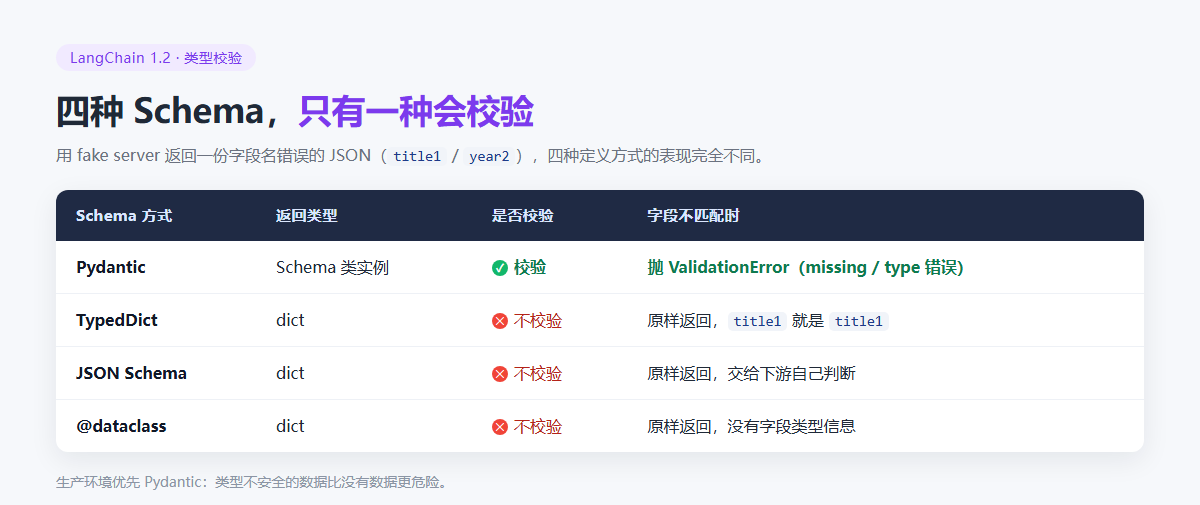
这个实验值得自己复现一次:它把「校验」这件抽象的事变成了可见的差异。类型不安全的数据比没有数据更危险——拿不到值时程序会报错,拿到错值时程序会悄悄算错。
22.6 四种模式怎么选
| 场景 | 选择 | 理由 |
|---|---|---|
| 生产环境、要校验、要类型补全 | Pydantic | 唯一返回实例并校验,出错位置明确 |
| 临时脚本、只要个 dict | TypedDict | 写法轻,Annotated 还能写描述 |
| 结构来自外部系统、跨语言 | JSON Schema | 通用格式,但注意供应商是否支持 json_schema 模式 |
| 不想引入 Pydantic 依赖 | @dataclass | 标准库,写法最简,但不校验 |
另外两条经验:先用 with_structured_output 跑通,再考虑 include_raw=True 拿原始响应排查问题;结构一旦稳定就固定下来,别在运行期动态拼 Schema——动态结构最难调试。
22.7 小结
三种轻量模式都能拿到结构化的字典,但都不做校验,出问题时错误会推迟到下游才暴露。选择逻辑很简单:要求正确性就上 Pydantic,只要求形状就用 TypedDict 或 @dataclass,需要跨语言才用 JSON Schema。
结构化输出到这里告一段落。下一章进入智能体:前面 Tools 有了手脚、结构化输出有了可靠的接口,接下来看谁来调度它们——LangChain 1.2 的 Agent。
上一篇:Pydantic 模式——从字段描述到可选值、枚举与嵌套;系列第一篇:为什么需要 LangChain。
本文根据公开课程课件整理,并结合 LangChain 官方文档核对与补充。