上一篇的工具描述只写了一行 docstring,模型照样调用了——但那是运气好。真正决定「模型会不会调、参数填对没填对」的,是 bind_tools() 底层生成的那份 JSON Schema:工具名、描述、每个参数的名称与类型,全在里面。这一篇把这份描述拆开,从函数一路看到 Schema。
18.1 模型看到的不是你的函数,是 JSON Schema
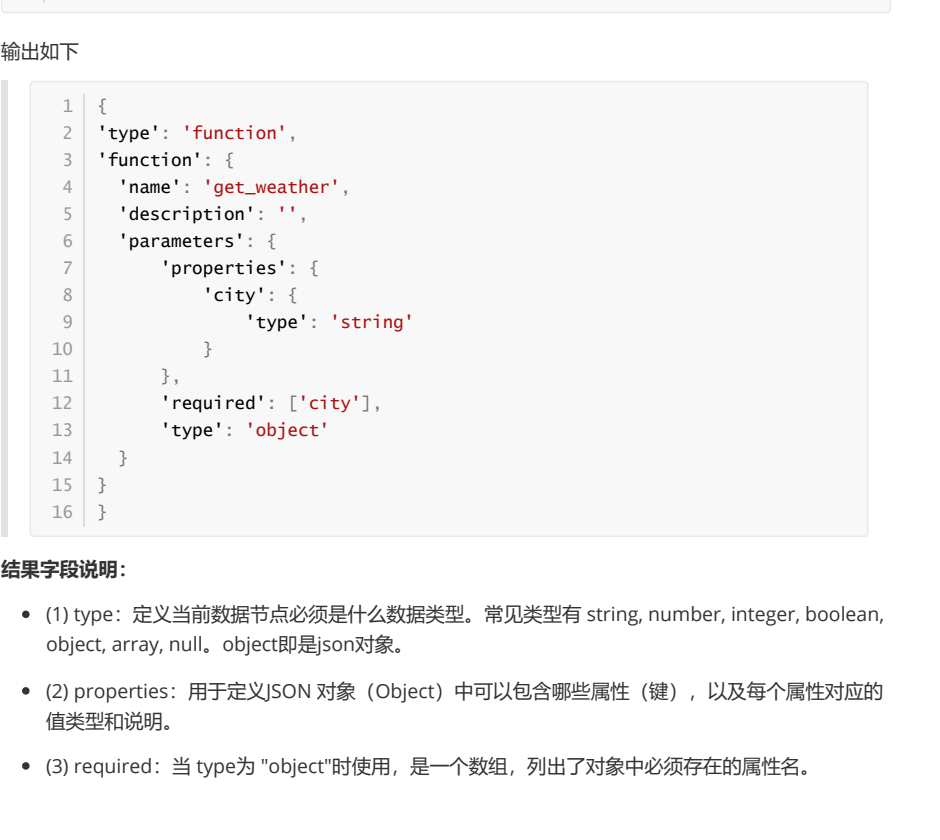
执行 model.bind_tools([get_weather]) 时,LangChain 会先把工具转成标准描述,再作为请求的一部分发给模型。这个转换函数可以直接调用,用来验证「模型到底看见了什么」:
from langchain_core.utils.function_calling import convert_to_openai_tool
from rich import print as rprint

def get_weather(city: str):
    return f"{city}天气晴朗"

rprint(convert_to_openai_tool(get_weather))
输出:
{
  'type': 'function',
  'function': {
    'name': 'get_weather',
    'description': '',
    'parameters': {
      'properties': {
        'city': {'type': 'string'}
      },
      'required': ['city'],
      'type': 'object'
    }
  }
}
三个字段需要看懂:
| 字段 | 作用 | 常见取值 |
|---|---|---|
type |
声明该节点是什么数据类型 | string、number、integer、boolean、object、array、null;object 即 JSON 对象 |
properties |
声明对象里可以有哪些属性,以及每个属性的类型与说明 | 键为参数名,值为参数描述 |
required |
声明哪些属性必须有值 | 参数名数组 |
注意上面 description 是空的——因为函数没有 docstring。这份描述会被原样发给模型,模型看到的全部信息就这些。它不知道 get_weather 是查什么天气、city 该填「北京」还是「beijing」,调用准确率自然上不去。
顺便解答一个常见疑问:为什么没加 @tool 的函数也能当工具?看 convert_to_openai_tool 的分支就明白了:
elif isinstance(function, BaseTool):
    oai_function = cast("dict", _format_tool_to_openai_function(function))
elif callable(function):
    oai_function = cast(
        "dict", _convert_python_function_to_openai_function(function)
    )
加了 @tool 的走上面的 BaseTool 分支,普通函数走下面的 callable 分支——后者会基于函数定义和 docstring 生成 Pydantic 模型,再转成规范的工具描述。两条路殊途同归,只是一个帮你做了,一个让你自己写。
18.2 方式 1:不用 @tool,靠函数签名和 docstring
不给 @tool,描述信息就全靠函数本身提供:docstring 提供描述和参数说明,类型注解提供参数类型,默认值决定是否必填。
18.2.1 description 来自 docstring
convert_to_openai_tool 会从 docstring(三个双引号包裹的文档字符串)里抽取工具描述。之前 docstring 为空,所以 description 是空字符串;补上一句就有了:
from langchain_core.utils.function_calling import convert_to_openai_tool
from rich import print as rprint

def get_weather(city: str):
    """
    天气查询工具
    """
    return f"{city}天气晴朗"

rprint(convert_to_openai_tool(get_weather))
{
'type': 'function',
'function': {
'name': 'get_weather',
'description': '天气查询工具',
'parameters': {
'properties': {'city': {'type': 'string'}},
'required': ['city'],
'type': 'object'
}
}
}参数仍然只有 type,没有 description。要给参数加说明,docstring 必须按 Google 风格写。
18.2.2 参数说明必须用 Google 风格 docstring
Google 风格就是用 Args:、Returns:、Raises: 等关键字分段(规范见 Google Python Style Guide)。日常不用通读规范,照下面的样子仿写就够:
from langchain_core.utils.function_calling import convert_to_openai_tool
from rich import print as rprint

def get_weather(city: str):
    """
    天气查询工具
    Args:
        city: 城市名称
    """
    return f"{city}天气晴朗"

rprint(convert_to_openai_tool(get_weather))
{
'type': 'function',
'function': {
'name': 'get_weather',
'description': '天气查询工具',
'parameters': {
'properties': {
'city': {'description': '城市名称', 'type': 'string'}
},
'required': ['city'],
'type': 'object'
}
}
}多了 "description": "城市名称"。别小看这一行,它直接决定模型填参数时是「北京」还是「Beijing」。
反面教材与正面写法对比:
# ❌ 不好:太模糊,模型无法判断何时调用
@tool
def tool1(x: str) -> str:
    """做一些事情"""
    ...

# ✅ 好:用途、参数格式、返回格式都写清楚
@tool
def search_products(query: str) -> str:
    """
    在产品数据库中搜索产品
    Args:
        query: 搜索关键词,如 "笔记本电脑"、"手机"
    Returns:
        产品列表的 JSON 字符串
    """
    ...
18.2.3 参数类型来自类型注解
把 city: str 的类型注解去掉,参数描述里就没有 type 了:
def get_weather(city):
    """
    天气查询工具
    """
    return f"{city}天气晴朗"
'properties': {'city': {}}而且顺序有讲究:docstring 里写了参数说明,函数就必须有对应的类型注解,否则直接报错:
ValueError: Arg city in docstring not found in function signature.18.2.4 默认值决定是否进 required
参数没有默认值,就会出现在 required 列表里;有默认值,则参数描述中多一个 default 字段,并且不进 required:
def get_weather(city: str = "北京"):
    """
    天气查询工具
    Args:
        city: 城市名称
    """
    return f"{city}天气晴朗"
'properties': {
'city': {'default': '北京', 'description': '城市名称', 'type': 'string'}
},
'type': 'object'只有一个参数且它有默认值,required 字段被整个移除。多参数时只保留没默认值的那些:
def get_weather(dt: str, city: str = "北京"):
    """
    天气查询工具
    Args:
        dt: 日期
        city: 城市名称
    """
    return f"{city}天气晴朗"
'required': ['dt']这条规则很实用:把「可省略」的参数给默认值,模型就不会硬编一个值填进去。
18.3 方式 2:@tool 装饰器(推荐)
@tool 把普通函数自动转成智能体可调用的工具,代码量最少,适合快速验证和参数简单的场景。
18.3.1 没有 docstring 会直接报错
from langchain.tools import tool

@tool
def get_weather(city: str):
    return f"{city}天气晴朗"
ValueError: Function must have a docstring if description not provided.补上 docstring 即可。@tool 同样要求 Google 风格,解析出来的结果与不用装饰器时一致。
18.3.2 description 参数优先于 docstring
不想改 docstring,可以直接传 description,它的优先级高于函数说明:
@tool(description="根据城市名称查询当日天气的工具")
def get_weather(city: str):
    """
    天气查询工具
    """
    return f"{city}天气晴朗"
'description': '根据城市名称查询当日天气的工具'18.3.3 parse_docstring:把参数说明解析进 Schema
默认情况下 @tool 把整个 docstring 当 description 用,Args: 里那些参数说明会被揉进描述文本,参数本身还是没有 description:
@tool
def get_weather(city: str, units: str = "celsius", include_forecast: bool = False) -> str:
    """
    获取当日天气,可选择是否同时查询未来五日天气预报
    Args:
        city: 城市
        units: 气温单位,可选:celsius-摄氏度,fahrenheit-华氏度
        include_forecast: 是否包含未来五日的天气预报
    """
    ...
'description': '获取当日天气,可选择是否同时查询未来五日天气预报\n\nArgs:\n city: 城市 \n units: 气温单位,可选:celsius-摄氏度,fahrenheit-华氏度 \n include_forecast: 是否包含未来五日的天气预报 '加上 parse_docstring=True 才是想要的效果:
@tool(parse_docstring=True)
def get_weather(city: str, units: str = "celsius", include_forecast: bool = False) -> str:
    """..."""
'description': '获取当日天气,可选择是否同时查询未来五日天气预报',
'parameters': {
'properties': {
'city': {'description': '城市', 'type': 'string'},
'units': {'default': 'celsius', 'description': '气温单位,可选:celsius-摄氏度,fahrenheit-华氏度', 'type': 'string'},
'include_forecast': {'default': 'False', 'description': '是否包含未来五日的天气预报', 'type': 'boolean'}
}
}请记住这个开关:要让 Args: 生效,必须写 parse_docstring=True。
另一个坑:docstring 不合法时,不加 @tool 会被当普通文本直接塞进 description,加了 @tool + parse_docstring 则抛异常:
ValueError: Found invalid Google-Style docstring.18.3.4 改工具名:name_or_callable
默认用函数名当工具名,也可以传参改掉,name_or_callable= 这个关键字可以省略,直接位置传字符串:
@tool(name_or_callable="getWeather")
def get_weather(city: str):
    """天气查询工具"""
    return f"{city}天气晴朗"

# 等价写法
@tool("getWeather")
def get_weather(city: str):
    """天气查询工具"""
    return f"{city}天气晴朗"
'name': 'getWeather'两条注意:不要用 config 或 runtime 当参数名,这两个是 LangChain 内部保留的;实际开发中工具名习惯与函数名保持一致,改名会让调用日志和调试变得难对照,非必要不改。
18.4 参数复杂时:args_schema
参数一多,光靠函数签名就不够用了——想要枚举、范围限制、更复杂的校验,得显式定义参数模型。args_schema 支持两种写法。
18.4.1 方式 1:Pydantic 模型
Pydantic 提供类型检查和数据验证,适合需要枚举、范围、业务校验的参数。三个常用构件:
① BaseModel:声明字段结构。继承 BaseModel 定义模型,字段用类型注解声明:
from pydantic import BaseModel

class WeatherInput(BaseModel):
    city: str

print(WeatherInput(city="北京"))   # city='北京'
注意 BaseModel 不接受位置参数,只能传关键字参数,否则报错:
TypeError: BaseModel.__init__() takes 1 positional argument but 2 were given原因是它的初始化签名是 def __init__(self, /, **data: Any) -> None:所有关键字参数收进 data,再按类型注解校验,失败就抛异常。
② Field:定制字段。用来设置默认值和描述,description 尤其重要,它直接决定模型能不能理解参数含义:
from pydantic import BaseModel, Field

class WeatherInput(BaseModel):
    city: str = Field(default="北京", description="城市")
    include_forecast: bool = Field(default=False, description="是否包含未来五日天气预报")

print(WeatherInput())   # city='北京' include_forecast=False
③ Literal:限定枚举。字段只能取几个固定字面量之一:
from typing import Literal
from pydantic import BaseModel, Field

class WeatherInput(BaseModel):
    city: str = Field(default="北京", description="城市")
    unit: Literal["celsius", "fahrenheit"] = Field(default="celsius", description="气温单位")
    include_forecast: bool = Field(default=False, description="是否包含未来五日天气预报")

print(WeatherInput(city="北京", unit="celsius"))
# city='北京' unit='celsius' include_forecast=False

try:
    WeatherInput(city="北京", unit="kelvin")
except Exception as e:
    print("报错类型:", type(e).__name__)
    print(e)
报错类型: ValidationError
1 validation error for WeatherInput
unit
Input should be 'celsius' or 'fahrenheit' [type=literal_error,
input_value='kelvin', input_type=str]把模型挂到工具上,用 args_schema 参数:
from langchain.tools import tool
from langchain_core.utils.function_calling import convert_to_openai_tool

@tool(args_schema=WeatherInput)
def get_weather(city: str, unit: str = "celsius", include_forecast: bool = False) -> str:
    """获取当日天气,可选未来五日天气预报"""
    temp = 22 if unit == "celsius" else 72
    result = f'{city} 当天气温: {temp} {"摄氏度" if unit == "celsius" else "华氏度"}'
    if include_forecast:
        result += "\n未来五天都是晴天"
    return result

print(convert_to_openai_tool(get_weather))
'parameters': {
'properties': {
'city': {'default': '北京', 'description': '城市', 'type': 'string'},
'unit': {'default': 'celsius', 'description': '气温单位',
'enum': ['celsius', 'fahrenheit'], 'type': 'string'},
'include_forecast': {'default': False, 'description': '是否包含未来五日天气预报', 'type': 'boolean'}
},
'type': 'object'
}Literal 变成了 enum,模型从此只能在这两个值里挑。调用前 Pydantic 会再做一次校验,参数类型不对、枚举越界都会在本地被拦下,不用等模型胡编。
18.4.2 方式 2:JSON Schema 字典
如果参数结构需要运行时动态生成(来自数据库配置或用户输入),Pydantic 类就写不出来了,可以直接给一个符合 JSON Schema 标准的字典:
from langchain.tools import tool
from langchain_core.utils.function_calling import convert_to_openai_tool

weather_schema = {
    "type": "object",
    "properties": {
        "location": {"type": "string"},
        "units": {"type": "string"},
        "include_forecast": {"type": "boolean"}
    },
    "required": ["location", "units", "include_forecast"]
}

@tool(args_schema=weather_schema)
def get_weather(city: str, unit: str = "celsius", include_forecast: bool = False) -> str:
    """获取当日天气,可选未来五日天气预报"""
    ...
这里有个容易错的点:args_schema 只接收 parameters 那一段,不要传完整的外层结构。下面这份「完整描述」是错的:
{
  "type": "function",
  "function": {
    "name": "get_weather",
    "description": "获取当日天气,可选未来五日天气预报",
    "parameters": { ... }
  }
}
正确传的是从 parameters 里取出的对象:
{
  "type": "object",
  "properties": {
    "location": {"type": "string"},
    "units": {"type": "string"},
    "include_forecast": {"type": "boolean"}
  },
  "required": ["location", "units", "include_forecast"]
}
注意 schema 里的字段名是 location,而函数参数叫 city。这种不一致会让模型传参和函数接收对不上——用 JSON Schema 时,字段名必须与函数参数名严格一致,LangChain 不会替你猜。
18.5 三种方式怎么选
| 方式 | 描述来源 | 适合场景 | 成本 |
|---|---|---|---|
| 普通函数 + 签名 | 函数名 + docstring + 类型注解 | 快速验证、临时工具 | 最低,但容易漏描述 |
@tool 装饰器 |
docstring(或 description 参数) | 绝大多数业务工具 | 低,几行装饰器 |
args_schema |
Pydantic 模型或 JSON Schema | 参数多、要枚举/校验/动态生成 | 较高,换来确定性 |
写工具时按这个顺序下手:先写好 docstring(用途 + Args + Returns),再决定要不要 @tool,最后只在参数需要约束时才上 args_schema。反过来先堆 Schema 再补描述,通常是在给模型制造噪音。
下一篇进入实战:把 args_schema、docstring、多工具循环串成完整例子,再用 tool_choice 控制模型必须调、不许调、或只能调某一个工具。
上一篇:Tools 是什么——让模型从「会说」到「会做」;系列第一篇:为什么需要 LangChain。
本文根据公开课程课件整理,并结合 LangChain 官方文档核对与补充。